

Introduction
We touch them every day, often without realizing it. Whether you are reheating lunch in a microwave, setting the speed on a treadmill, or operating a control panel in a hospital, you are likely using a membrane switch.
As an engineer, I’ve noticed a trend: while touchscreens get all the glory in consumer tech, membrane switches remain the industry standard for reliable, rugged, and cost-effective interfaces. Why? Because sometimes, you just need a button that works—rain or shine, with or without gloves.
In this guide, I will walk you through exactly what a membrane switch is, how it is constructed, and why it might be the perfect solution for your next hardware project.
What Exactly is a Membrane Switch?
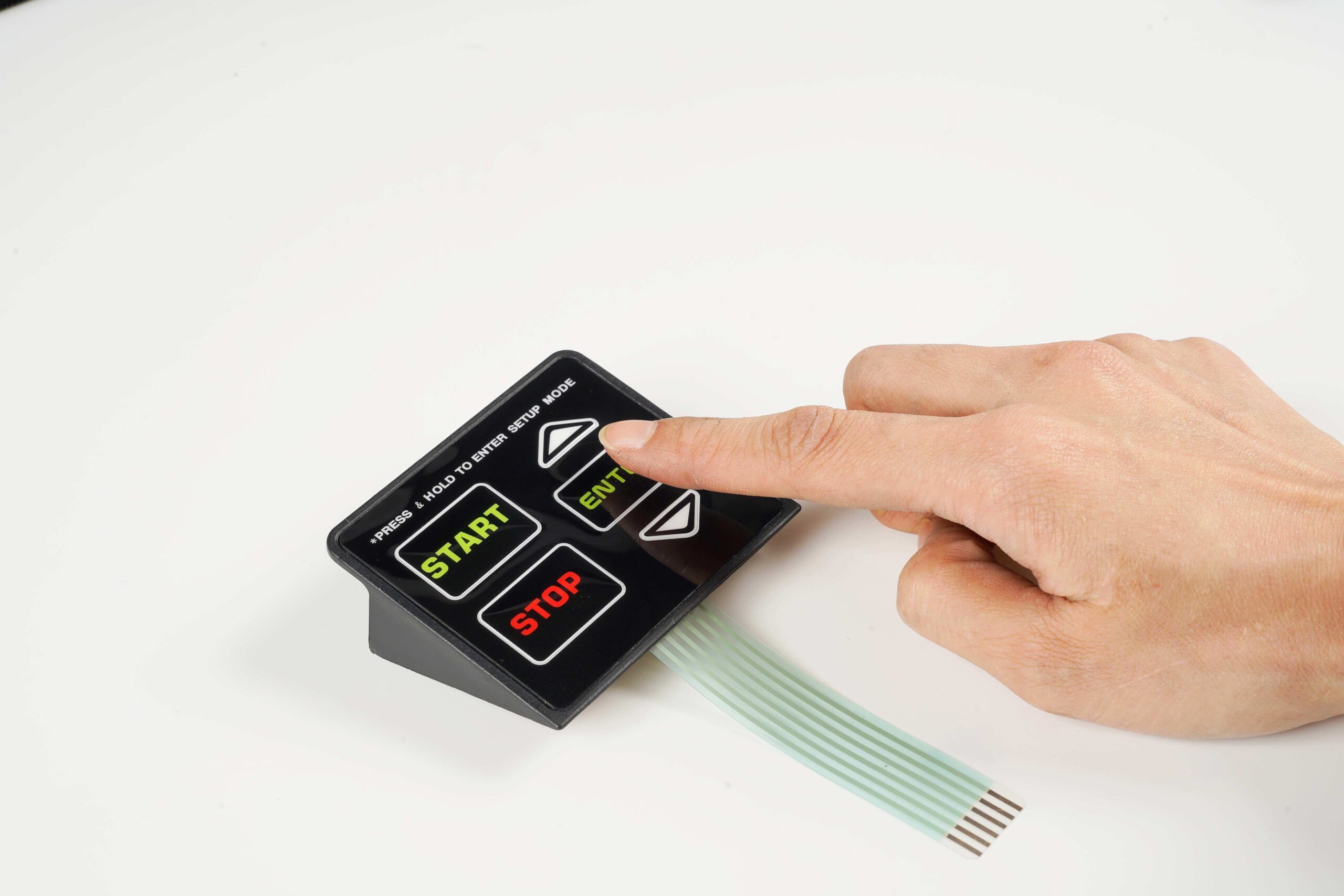
In simple terms, a membrane switch is an electrical switch for turning a circuit on and off. But unlike a traditional mechanical switch (which uses copper parts and plastic parts moving against each other), a membrane switch is a printed electronic circuit.
Think of it as a “sandwich” of very thin layers. These layers are printed on flexible materials like Polyester (PET) or Polycarbonate, and they are bonded together using heat-stabilized adhesives. When you press the top layer, it flexes down to touch the bottom layer, closing the circuit and sending a signal.
The Anatomy of a Switch: 5 Key Layers
To understand why these switches are so durable, we need to look at their construction. A standard membrane switch typically has five to six layers:
-
The Graphic Overlay: This is the top skin of the assembly. It’s what the user sees and touches. High-quality overlays are usually reverse-printed on Polyester, meaning the ink is on the back side. This protects the text and icons from scratching or fading over time.
-
The Top Circuit: Located just under the overlay, this is a thin sheet of plastic with conductive ink (usually silver) printed on the underside.
-
The Spacer (Dielectric): This is the “insulator” layer. It has a hole cut out where the button is. Its job is to keep the top circuit and bottom circuit apart when no one is pressing the button.
-
The Bottom Circuit: This is the stable base layer, also printed with conductive silver ink.
-
The Rear Adhesive: This is simply the “glue” layer that mounts the entire switch assembly to your device’s housing or backplate.
Types of Membrane Switches
Not all switches feel the same. There are two main categories you should know:
-
Tactile Switches: These have a metal dome or a formed plastic dome inside. When you press them, you feel a “snap” or “click.” This is crucial for devices where the user can’t look at their hands, like a machine operator.
-
Non-Tactile Switches: These function the same way but feel “flat” (like a microwave button). They are quieter and often have a longer lifespan—sometimes up to 5 million actuations—because there is no dome to wear out.
Why Choose Membrane Switches?
If you are designing a product, here is why you might choose this technology over a standard mechanical keyboard or a touchscreen:
1. Water and Dust Resistance Because the graphic overlay is a single, continuous sheet of plastic, there are no gaps for water, oil, or dust to seep through. This makes them perfect for outdoor equipment or medical devices that need frequent cleaning.
2. Low Profile Design Membrane switches are incredibly thin—often less than 1mm thick. This saves valuable space inside your device for other components.
3. Ease of Cleaning In a hospital setting, crevices in a keyboard can harbor bacteria. A smooth membrane switch surface can be wiped down with disinfectant in seconds, making it a hygienic choice.
Conclusion
While they may not be as flashy as a high-definition touchscreen, membrane switches offer a unique combination of durability, sealability, and cost-effectiveness that is hard to beat.
Understanding the layers and mechanics of this technology allows engineers to create user interfaces that are not only functional but also built to last in the toughest environments.
Author Bio :
Liu is an electronics engineering enthusiast who loves exploring the mechanics behind everyday devices. With a background in HMI design, he frequently writes guides to help engineers bridge the gap between concept and manufacturing.
