

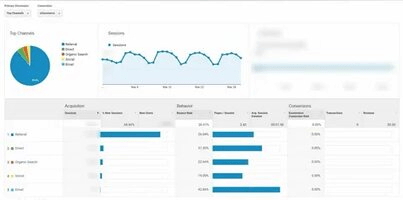
One of the most powerful ways to improve your website’s performance and boost traffic is by analyzing the Click Through Rate (CTR) in Google Analytics. As a key metric, CTR provides insight into how well your website is engaging visitors. By understanding and optimizing your Google Analytics CTR, you can make informed decisions that enhance your marketing strategy and drive more traffic to your site.
In this article, we’ll explore the importance of CTR, how to analyze it in Google Analytics, and strategies to improve it for better website performance.
What is CTR in Google Analytics?
CTR stands for Click Through Rate in Google Analytics, a metric that represents the percentage of people who click on a link compared to how many people view that link. In the context of Google Analytics, CTR typically refers to the number of clicks a particular URL gets divided by the number of impressions (views) of that URL. This metric is vital for measuring the effectiveness of your website’s content, ads, and marketing efforts.
A higher CTR indicates that your content is engaging and relevant to your audience, while a low CTR might suggest that your content or calls to action are not compelling enough.
Why is Google Analytics CTR Important?
Understanding and monitoring your Google Analytics CTR is crucial for several reasons:
- Measure Engagement: CTR is a direct reflection of how well your audience is engaging with your content.
- Optimize Marketing Efforts: By identifying pages or ads with high or low CTR, you can adjust your strategy to improve results.
- Better User Experience: A higher CTR usually indicates that users find your content valuable, which can lead to a better overall user experience.
- Improve Conversion Rates: A good CTR often correlates with higher conversion rates, meaning more visitors take the desired actions on your site, such as purchasing or subscribing.
How to Analyze CTR in Google Analytics
Analyzing CTR in Google Analytics can be done in several ways. Here’s a step-by-step guide:
Step 1: Link Your Google Search Console with Google Analytics
Google Analytics alone doesn’t provide all the CTR data you need. Linking it with Google Search Console allows you to get detailed information on how your site performs in search results.
- Go to Google Analytics > Acquisition > Search Console > Queries.
- Here, you’ll see various metrics, including CTR, impressions, and average position.
Step 2: Check the CTR for Specific Pages
In Google Analytics, you can track CTR for different pages by using landing page reports. To find these:
- Go to Acquisition > All Traffic > Channels.
- Select Organic Search to see data related to search traffic and CTR for individual pages.
Step 3: Use Google Analytics Goals and Conversions
Setting up goals in Google Analytics can help you monitor the CTR of specific actions like purchases, form submissions, or other conversions. By analyzing how these actions align with your CTR, you can refine your content strategy.
Step 4: Use UTM Parameters for Campaign Tracking
If you’re running paid ads or email marketing campaigns, you can track CTR more accurately by adding UTM parameters to your URLs. This allows you to analyze which campaigns are driving the most clicks in Google Analytics.
Key Metrics to Analyze Alongside CTR
While Google Analytics CTR is important, there are other metrics you should monitor to get a comprehensive view of your website’s performance:
Bounce Rate
A high bounce rate alongside a low CTR might indicate that visitors are clicking through, but not staying on your website. Improving your content or user experience could reduce the bounce rate.
Average Session Duration
This metric tells you how long users stay on your website after clicking through. A longer session duration generally means that users find your site engaging and valuable.
Conversion Rate
Ultimately, CTR is just one step in the funnel. The real goal is conversion. Analyze your conversion rates alongside CTR to see how many visitors are actually taking action after clicking through.
How to Improve CTR in Google Analytics
1. Optimize Your Meta Descriptions
The meta description is the snippet of text shown in search engine results. A compelling, well-written meta description can encourage users to click on your link, increasing your Google Analytics CTR. Ensure your meta descriptions are relevant and include a call to action (CTA).
2. Use Engaging Titles and Headlines
The title tag is one of the first things users see in search results. Make it clear, concise, and enticing. Use power words and include your target keywords to increase CTR.
3. Optimize Your Content for User Intent
Create content that matches what users are searching for. By aligning your content with user intent, you’re more likely to attract relevant traffic that will click on your links. This helps boost your CTR in Google Analytics.
4. Improve Your Site Speed
A fast-loading website provides a better user experience, which can lead to a higher CTR. Slow sites tend to lose visitors quickly, resulting in a lower CTR. Use tools like Google PageSpeed Insights to monitor and improve load times.
5. Implement Structured Data
Adding structured data to your site can enhance your search engine listings with rich snippets, such as star ratings or product prices. These visuals make your listing stand out, leading to a higher CTR.
The Role of A/B Testing in Improving CTR
A/B testing is an essential part of optimising CTR. By testing different versions of headlines, meta descriptions, or landing page elements, you can identify what resonates best with your audience. Implementing A/B tests regularly helps refine your content and messaging, leading to increased CTR over time.
Conclusion
Analyzing Google Analytics CTR is a crucial part of any digital marketing strategy. By understanding how users engage with your website, you can make data-driven decisions to enhance your content, improve user experience, and ultimately boost website traffic. With the right strategies and consistent optimization, you can significantly improve your CTR and see better results in your online marketing campaigns.
FAQs About Google Analytics CTR
Q1: What is a good CTR in Google Analytics?
A good CTR depends on your industry, but generally, a CTR between 1% and 5% is considered decent. However, a higher CTR indicates that your content or ads are highly engaging.
Q2: How can I improve my CTR in Google Analytics?
Improving your Google Analytics CTR involves optimizing your meta descriptions, using engaging headlines, aligning content with user intent, improving site speed, and adding structured data.
Q3: Why is my CTR low in Google Analytics?
A low CTR could indicate irrelevant content, ineffective meta descriptions, poor site speed, or weak calls to action. Analyze these areas to pinpoint areas for improvement.
Q4: How does Google Analytics track CTR?
Google Analytics tracks CTR by measuring the number of clicks your website receives divided by the number of impressions (views) it gets. This can be found in the Google Search Console section within Analytics.
Q5: Can I track CTR for individual pages in Google Analytics?
Yes, you can track CTR for specific pages by going to Acquisition > All Traffic > Channels > Organic Search. You can also link Google Search Console for more detailed insights.
